> ## Documentation Index
> Fetch the complete documentation index at: https://docs.etherscan.io/llms.txt
> Use this file to discover all available pages before exploring further.
# Etherscan CLI
> Query the Etherscan API from the terminal, scripts, and CI, with structured output for agents.
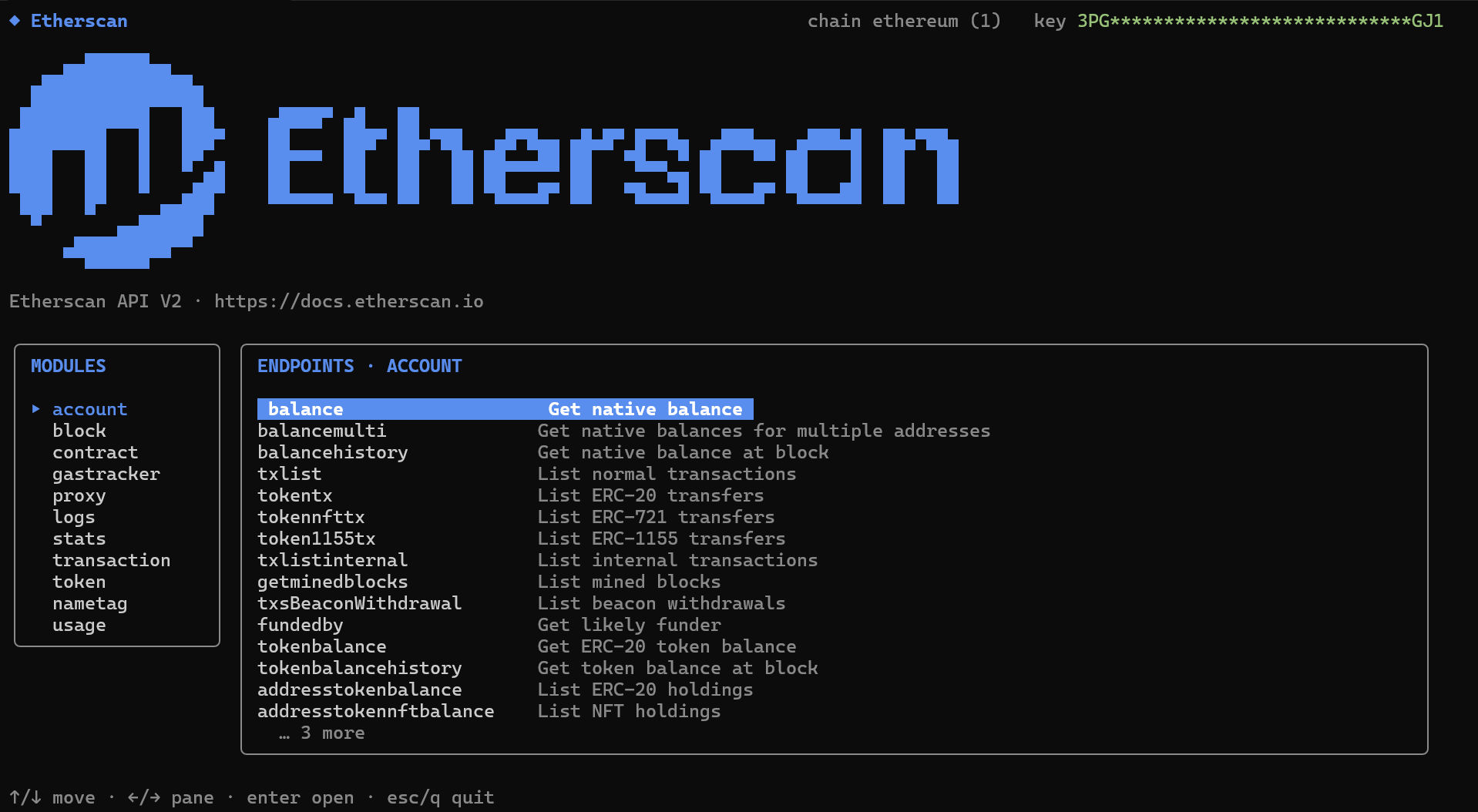
Explore endpoints interactively or script them across every [supported chain](/supported-chains) by name or ID, with clean JSON by default (or tables and CSV for people) across accounts, contracts, tokens, logs, gas, stats, and name tags.
 [GitHub →](https://github.com/etherscan/etherscan-cli) | [Command reference →](#command-reference)
## Get started
```bash Homebrew (macOS, Linux) theme={null}
brew install etherscan/etherscan-cli/etherscan
```
```bash Script (macOS, Linux) theme={null}
curl -fsSL https://raw.githubusercontent.com/etherscan/etherscan-cli/master/scripts/install.sh | sh
```
```powershell Windows theme={null}
# PowerShell
irm https://raw.githubusercontent.com/etherscan/etherscan-cli/master/scripts/install.ps1 | iex
# Command Prompt
powershell -NoProfile -ExecutionPolicy Bypass -Command "irm https://raw.githubusercontent.com/etherscan/etherscan-cli/master/scripts/install.ps1 | iex"
```
```bash Go theme={null}
# Requires Go 1.25+; ensure GOBIN (or GOPATH/bin) is on your PATH
go install github.com/etherscan/etherscan-cli/cmd/etherscan@latest
```
Then verify the install:
```bash theme={null}
etherscan version
```
Upgrade any time with:
```bash theme={null}
etherscan update
```
Prebuilt binaries for your operating system are also on the [releases page](https://github.com/etherscan/etherscan-cli/releases).
First, [create a free API key](/set-up-your-api-key) if you do not have one. Then save it locally and confirm the active identity:
```bash theme={null}
etherscan login
etherscan whoami
```
Get a native balance (JSON by default):
```bash theme={null}
etherscan account balance 0xd8dA6BF26964aF9D7eEd9e03E53415D37aA96045
```
Run the same query on another chain, by name or chain ID:
```bash theme={null}
etherscan --chain arbitrum account balance 0xd8dA6BF26964aF9D7eEd9e03E53415D37aA96045
```
List every supported chain:
```bash theme={null}
etherscan chains
```
Or open the full-screen interactive explorer:
```bash theme={null}
etherscan tui
```
## Command reference
Commands follow `etherscan `, mirroring the API. JSON is the default output; switch it with `-o table` or `-o csv`, use `--compact` to strip whitespace, and `--all` (bounded by `--max-pages`) to page through list endpoints.
| Module | Covers |
| ------------- | ------------------------------------------ |
| `account` | Balances, transactions, transfers, funding |
| `contract` | ABI, source, creation, verification |
| `transaction` | Execution and receipt status |
| `block` | Rewards, counts, timestamps |
| `gastracker` | Gas oracle and confirmation estimates |
| `logs` | Event logs |
| `stats` | Supply, price, and daily network metrics |
| `token` | Supply, holders, and token metadata |
| `proxy` | JSON-RPC-compatible calls |
For a command's options, run:
```bash theme={null}
etherscan --help
```
The full flag reference lives in the [README](https://github.com/etherscan/etherscan-cli#output-and-pagination).
## Practical workflows
Common tasks and the commands you would run for each.
### Follow wallet activity
Recent normal transactions:
```bash theme={null}
etherscan account txlist 0xd8dA6BF26964aF9D7eEd9e03E53415D37aA96045 --page 1 --offset 10
```
ERC-20 transfers as a readable table instead of the default JSON:
```bash theme={null}
etherscan account tokentx 0xd8dA6BF26964aF9D7eEd9e03E53415D37aA96045 -o table
```
Collect multiple pages for analysis:
```bash theme={null}
etherscan account txlist 0xd8dA6BF26964aF9D7eEd9e03E53415D37aA96045 --all --max-pages 50 -o csv
```
### Inspect a smart contract
WETH contract ABI:
```bash theme={null}
etherscan contract getabi 0xC02aaA39b223FE8D0A0e5C4F27eAD9083C756Cc2
```
Verified source metadata:
```bash theme={null}
etherscan contract getsourcecode 0xC02aaA39b223FE8D0A0e5C4F27eAD9083C756Cc2
```
### Switch chains
Chain names and numeric IDs both work:
```bash theme={null}
etherscan --chain arbitrum gastracker oracle
```
```bash theme={null}
etherscan --chain 42161 account balance 0xd8dA6BF26964aF9D7eEd9e03E53415D37aA96045
```
See every chain built into this release:
```bash theme={null}
etherscan chains
```
### Build scripts and agent workflows
Clean JSON for jq, Python, or an AI agent:
```bash theme={null}
etherscan account txlist 0xd8dA6BF26964aF9D7eEd9e03E53415D37aA96045 --compact | jq '.[0]'
```
CSV for spreadsheets and data pipelines:
```bash theme={null}
etherscan account tokentx 0xd8dA6BF26964aF9D7eEd9e03E53415D37aA96045 -o csv > token-transfers.csv
```
[GitHub →](https://github.com/etherscan/etherscan-cli) | [Command reference →](#command-reference)
## Get started
```bash Homebrew (macOS, Linux) theme={null}
brew install etherscan/etherscan-cli/etherscan
```
```bash Script (macOS, Linux) theme={null}
curl -fsSL https://raw.githubusercontent.com/etherscan/etherscan-cli/master/scripts/install.sh | sh
```
```powershell Windows theme={null}
# PowerShell
irm https://raw.githubusercontent.com/etherscan/etherscan-cli/master/scripts/install.ps1 | iex
# Command Prompt
powershell -NoProfile -ExecutionPolicy Bypass -Command "irm https://raw.githubusercontent.com/etherscan/etherscan-cli/master/scripts/install.ps1 | iex"
```
```bash Go theme={null}
# Requires Go 1.25+; ensure GOBIN (or GOPATH/bin) is on your PATH
go install github.com/etherscan/etherscan-cli/cmd/etherscan@latest
```
Then verify the install:
```bash theme={null}
etherscan version
```
Upgrade any time with:
```bash theme={null}
etherscan update
```
Prebuilt binaries for your operating system are also on the [releases page](https://github.com/etherscan/etherscan-cli/releases).
First, [create a free API key](/set-up-your-api-key) if you do not have one. Then save it locally and confirm the active identity:
```bash theme={null}
etherscan login
etherscan whoami
```
Get a native balance (JSON by default):
```bash theme={null}
etherscan account balance 0xd8dA6BF26964aF9D7eEd9e03E53415D37aA96045
```
Run the same query on another chain, by name or chain ID:
```bash theme={null}
etherscan --chain arbitrum account balance 0xd8dA6BF26964aF9D7eEd9e03E53415D37aA96045
```
List every supported chain:
```bash theme={null}
etherscan chains
```
Or open the full-screen interactive explorer:
```bash theme={null}
etherscan tui
```
## Command reference
Commands follow `etherscan `, mirroring the API. JSON is the default output; switch it with `-o table` or `-o csv`, use `--compact` to strip whitespace, and `--all` (bounded by `--max-pages`) to page through list endpoints.
| Module | Covers |
| ------------- | ------------------------------------------ |
| `account` | Balances, transactions, transfers, funding |
| `contract` | ABI, source, creation, verification |
| `transaction` | Execution and receipt status |
| `block` | Rewards, counts, timestamps |
| `gastracker` | Gas oracle and confirmation estimates |
| `logs` | Event logs |
| `stats` | Supply, price, and daily network metrics |
| `token` | Supply, holders, and token metadata |
| `proxy` | JSON-RPC-compatible calls |
For a command's options, run:
```bash theme={null}
etherscan --help
```
The full flag reference lives in the [README](https://github.com/etherscan/etherscan-cli#output-and-pagination).
## Practical workflows
Common tasks and the commands you would run for each.
### Follow wallet activity
Recent normal transactions:
```bash theme={null}
etherscan account txlist 0xd8dA6BF26964aF9D7eEd9e03E53415D37aA96045 --page 1 --offset 10
```
ERC-20 transfers as a readable table instead of the default JSON:
```bash theme={null}
etherscan account tokentx 0xd8dA6BF26964aF9D7eEd9e03E53415D37aA96045 -o table
```
Collect multiple pages for analysis:
```bash theme={null}
etherscan account txlist 0xd8dA6BF26964aF9D7eEd9e03E53415D37aA96045 --all --max-pages 50 -o csv
```
### Inspect a smart contract
WETH contract ABI:
```bash theme={null}
etherscan contract getabi 0xC02aaA39b223FE8D0A0e5C4F27eAD9083C756Cc2
```
Verified source metadata:
```bash theme={null}
etherscan contract getsourcecode 0xC02aaA39b223FE8D0A0e5C4F27eAD9083C756Cc2
```
### Switch chains
Chain names and numeric IDs both work:
```bash theme={null}
etherscan --chain arbitrum gastracker oracle
```
```bash theme={null}
etherscan --chain 42161 account balance 0xd8dA6BF26964aF9D7eEd9e03E53415D37aA96045
```
See every chain built into this release:
```bash theme={null}
etherscan chains
```
### Build scripts and agent workflows
Clean JSON for jq, Python, or an AI agent:
```bash theme={null}
etherscan account txlist 0xd8dA6BF26964aF9D7eEd9e03E53415D37aA96045 --compact | jq '.[0]'
```
CSV for spreadsheets and data pipelines:
```bash theme={null}
etherscan account tokentx 0xd8dA6BF26964aF9D7eEd9e03E53415D37aA96045 -o csv > token-transfers.csv
```